Quick start
Turn a measured temperature into interpretable linguistic grades, then choose a label. FuzzyRoutines provides scalar fuzzy sets, eight membership families, explicit combination policies, linguistic scales, alpha cuts, and continuous centroids. The modern API requires CPython 3.13 or 3.14 and has no mandatory NumPy or plotting dependency.
Install
Create an isolated environment:
python -m venv .venv
# Linux/macOS:
source .venv/bin/activate
# Windows PowerShell: .venv\Scripts\Activate.ps1
python -m pip install --upgrade pip
For the stable 2.0.0 package on PyPI:
python -m pip install fuzzyroutines==2.0.0
Older 1.x releases do not provide this modern API.
For development or a candidate that has not yet been published, install from a reviewed Git revision instead:
python -m pip install "fuzzyroutines @ git+https://github.com/Fuzzy-Technologies/FuzzyRoutines.git@develop"
This command requires Git and follows the moving develop branch. For a
reproducible experiment, replace develop with the full reviewed commit SHA.
The public modern API used here is available at
bd239d2b0972a796c4084498676042bdb7016bed. Candidate preparation alone does not
mean that the PyPI release has been published.
Measure and classify in a few lines
Suppose a room is at 24 °C. We define an illustrative Comfort triangle with full membership at 22 °C, declining to zero at 16 and 28 °C. Warm rises smoothly from 22 to 30 °C. Choose these thresholds with the people who understand your application; they are model assumptions, not parameters learned by the library.
from math import isclose
from fuzzyroutines import (
    ContinuousUniverse, LinguisticScale, LinguisticTerm,
    ScalarFuzzySet, SShoulder, Triangle,
)

universe = ContinuousUniverse(0, 40, leftClosed=True, rightClosed=True)
scale = LinguisticScale((
    LinguisticTerm("Comfort", ScalarFuzzySet(universe, Triangle(16, 22, 28))),
    LinguisticTerm("Warm", ScalarFuzzySet(universe, SShoulder(22, 30))),
))
result = scale.Fuzzify(24)
grades = {item.term.name: item.grade for item in result.memberships}
assert isclose(grades["Comfort"], 2 / 3)
assert grades["Warm"] == 0.125
assert result.selectedTerms[0].name == "Comfort"
print(grades, result.selectedTerms[0].name)
The result is Comfort ≈ 0.667, Warm = 0.125, and the selected label is
Comfort. A grade describes compatibility with a defined concept. It is
not a probability, and the grades need not sum to one. Fuzzify reports all
grades; selection follows an explicit policy, with the first strongest term
selected by default.
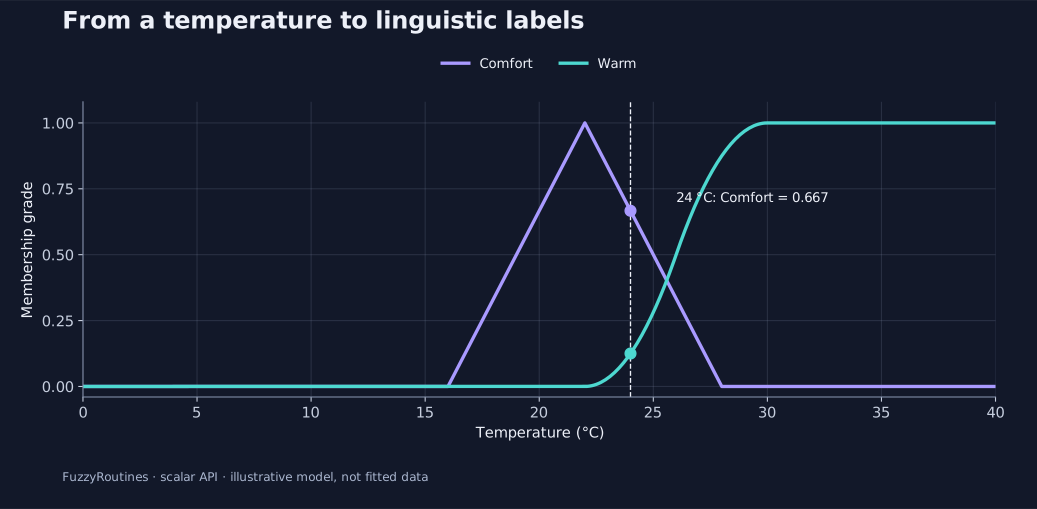
The curves show the model on the declared 0–40 °C universe. The dashed line is the measurement, and the dots are the two computed grades. This two-label example deliberately leaves some temperatures uncovered. Check coverage before using it as a complete operational scale.
Combine, inspect, and explain a result
Continue with the nine worked scenarios. They cover physical measurements, policy choices, abstention, directed fuzzy difference, alpha cuts, centroids, scale diagnosis, and custom models. Each includes self-contained code, expected numbers, and a figure. The membership gallery helps choose a curve.
The script
examples/guide.py
runs all nine scenarios and checks independent numerical expectations. From a
checkout with the package installed:
python -I examples/guide.py
python -I examples/guide.py --scenario centroid
You can copy a scenario into your project. Its scalar computations use only
FuzzyRoutines and the Python standard library; the checked-in SVGs require no
plotting package to view. To regenerate the figures from a checkout, install
docs/requirements-plots.txt and run tools/generate_guide_figures.py as
described in the figure provenance guide.
For older MFunction, FuzzySet, and FuzzyScale code, start with the
historical facade. Modern sets and policies are immutable;
the historical facade deliberately preserves its mutable compatibility contract.